

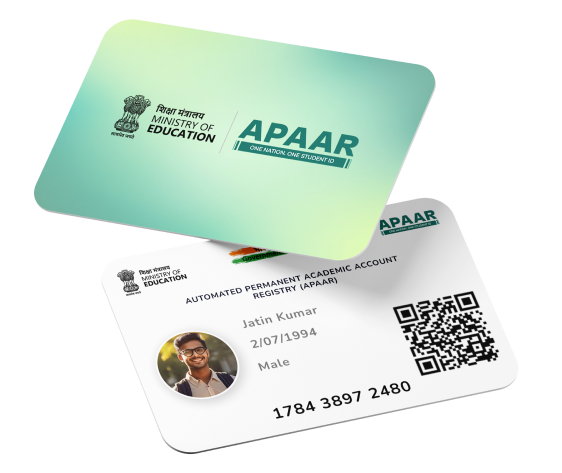
The Automated Permanent Academic Account Registry (APAAR) ID is a transformative initiative under India’s National Education Policy (NEP) 2020, designed to provide every student with a unique 12-digit digital identifier. This “One Nation, One Student ID” system streamlines the management of academic records, including scorecards, certificates, degrees, and co-curricular achievements, by storing them digitally.
Integrated with platforms like DigiLocker and Aadhaar, APAAR ID ensures secure, accessible, and verifiable academic credentials. This guide provides detailed instructions on registering for an APAAR ID, logging into the system, downloading the ID card, and managing the parental consent form for minors, addressing key aspects for students and parents.
What is APAAR ID?
APAAR ID, or Automated Permanent Academic Account Registry ID, is a lifelong digital identifier for students in India, both in government and private educational institutions. It centralizes academic records, facilitating seamless transitions between schools and colleges, credit transfers, and verification for educational and employment purposes. The system aligns with the National Credit Framework (NCrF) and supports the Digital India initiative by reducing paperwork and enhancing transparency. However, concerns about data privacy due to Aadhaar linkage have sparked debates, with the government emphasizing strict, consent-based data security measures to address these issues.
APAAR ID Registration Process
Registering for an APAAR ID involves a straightforward process, typically managed through the Academic Bank of Credit APAAR portal and DigiLocker. Below are the steps to register:

- Visit the Apaar Website: Access the Academic Bank of Credit portal at APAAR Portal.
- Navigate to ‘My Account’: Select the “Student” option to begin registration.
- Create a DigiLocker Account: If not already registered, create an account on DigiLocker by providing your phone number, address, and Aadhaar details.
- Authorize e-KYC: Log in to DigiLocker and permit the Apaar to access Aadhaar information for electronic Know Your Customer (e-KYC) verification.
- Enter Academic Details: Input details such as your institution’s name, class, and course information.
- Submit the Form: Submit the form to generate your unique 12-digit APAAR ID.
For students under 18, parental consent is mandatory. Parents must complete and submit a consent form to the student’s school, which is verified before the ID is issued. Schools may also initiate the registration process by providing a provisional APAAR ID, which students can later authenticate.
Required details for APAAR ID:
- UDISE+ Student ID (PEN)
- Student’s Name
- Date of Birth (DOB)
- Gender
- Mobile Number
- Mother’s Name
- Father’s Name
- Name as per Aadhaar

Table: APAAR ID Registration Steps
Logging into the APAAR System
To access APAAR ID records and services, students can log in through one of two platforms:
- DigiLocker: Visit DigiLocker and log in using your registered phone number or email and password. This platform stores the APAAR ID card and other academic documents.
- Apaar Portal: Access the Academic Bank of Credit portal at APAAR Portal using your account credentials, which are linked to your DigiLocker or Aadhaar details.
Both platforms require secure authentication, often involving a one-time password (OTP) sent to the registered mobile number or email. Ensure your Aadhaar details are up-to-date, as they are linked to the APAAR ID for verification.
Downloading the APAAR ID Card
Once the APAAR ID is generated, students can download their ID card through two primary methods, ensuring easy access to their digital credentials.
Through DigiLocker
- Log In: Access your DigiLocker account at DigiLocker.
- Search Documents: Click on “Search Documents” and type “Academic Bank of Credits” in the search bar.
- Select APAAR ID Card: Choose the “Apaar ID Card” option from the results.
- Enter Details: Provide personal and academic details, check the consent box, and click “Get Document.”
- Download: Once generated, navigate to the “Issued Documents” section, locate the “Apaar ID Card,” and click the download icon to save the PDF.

Through the Apaar Portal
- Log In: Sign in to the Apaar portal at APAAR ID Portal.
- Locate Download Option: On the dashboard, find and click the “APAAR Card Download” option.
- View Card: The APAAR ID card will appear on the screen.
- Download or Print: Click “Download” or “Print” to save the card as a PDF or print a physical copy.
Students can also check the status of their APAAR ID on the UDISE+ Portal (UDISE+ Portal) under the APAAR Module or consult their school for verification details.
Table: APAAR ID Card Download Methods
| Method | Steps | Platform |
|---|---|---|
| DigiLocker | Log in, search “Academic Bank of Credits,” select APAAR ID, enter details, download from “Issued Documents.” | DigiLocker |
| Apaar Portal | Log in, select “APAAR Card Download,” download or print the card. | APAAR ID Portal |
Consent Form for APAAR ID
For students under 18, parental consent is a critical requirement for APAAR ID registration. The consent form ensures that parents or guardians approve the collection and use of their child’s data. Here’s how to manage the consent form:
- Download the Form: Visit the official APAAR website at APAAR Portal.
- Access Resources: Scroll to the “Resources” section on the homepage.
- Select Consent Form: Click the download icon next to “APAAR Parental Consent Form (English).”
- Complete the Form: Fill in the required details, such as the student’s name, Aadhaar number, and parental information.
- Submit to School: Submit the completed form to the student’s school for verification and processing.
Parents have the flexibility to withdraw consent at any time by following the guidelines on the APAAR website. Schools may also provide the consent form directly to parents, streamlining the process.
Table: Consent Form Process
| Step | Action | Details |
|---|---|---|
| 1 | Download Form | Access APAAR Portal and go to “Resources.” |
| 2 | Select Form | Click on “APAAR Parental Consent Form (English).” |
| 3 | Fill Details | Enter student and parental information. |
| 4 | Submit | Provide the form to the school. |
| 5 | Withdraw Consent (Optional) | Follow website guidelines to revoke consent. |
Benefits of APAAR ID
The APAAR ID offers several advantages for students and the education system:
- Centralized Records: Stores all academic and co-curricular achievements in one digital platform.
- Seamless Transitions: Simplifies transfers between educational institutions by providing verified records.
- Fraud Prevention: Reduces the risk of document duplication and fraud through digital verification.
- Career Support: Facilitates credential verification for higher education and job applications.
- Credit Recognition: Integrates with the Academic Bank of Credits for standardized credit transfers.

Addressing Privacy Concerns
The linkage of APAAR ID with Aadhaar has raised concerns about data privacy among some stakeholders. The government has assured that data is protected with strict security measures and shared only with necessary agencies upon consent. Parents and students are encouraged to review how their data is handled and ensure it is used solely for educational purposes. The option to withdraw consent provides additional control over personal information.
Recent Updates (June 2025)
As of June 2025, the APAAR ID system continues to be implemented across Indian schools, with ongoing efforts to address technical challenges, such as portal access issues reported in some regions. The integration with the National Testing Agency (NTA) for exams like NEET highlights its growing importance in competitive education. Students are advised to verify their Aadhaar details, as updates to Aadhaar automatically reflect in the APAAR ID, ensuring accuracy.
Additional Resources
- Helpline Number: For assistance, contact 18008893511.
- Official Website: Visit APAAR Portal for updates and resources.
- DigiLocker Support: Access DigiLocker for document management.
- UDISE+ Portal: Check APAAR ID status at UDISE+ Portal.
Frequently Asked Questions (FAQs)
What is an APAAR ID?
A 12-digit digital identifier for students to manage academic records.
Is APAAR ID mandatory?
It is voluntary, though encouraged by educational boards for efficiency.
How do I update my APAAR ID details?
Update your Aadhaar card, as APAAR ID is linked to it.
Can parents access the APAAR ID?
Yes, with proper authentication and consent.
What if I face issues downloading the ID?
Contact the helpline at 18008893511 or check with your school.
Conclusion
The APAAR ID card is a pivotal tool in modernizing India’s education system, offering students a secure and efficient way to manage their academic records. By following the outlined steps for registration, login, downloading, and obtaining the consent form, students and parents can fully leverage this digital initiative.
Despite concerns about data privacy, the government’s emphasis on consent-based security ensures a balanced approach. For the latest information or assistance, refer to the official APAAR website or contact the provided helpline.